
Yard Checker Golf Rangefinder
- Measures distances using Google Maps
- Fully web-based (No downloads needed)
- App-like design for easy operation
☆Just click the link below!
Summary
Using Yard Checker, you can easily measure the distance from your
ball position to the green while you play.
After playing, you can check your shot log. Yard Checker is completely free.
Tutorial
In this tutorial, you can experience how to use Yard Checker by
following the instructions step by step.
You can operate Yard
Checker from your home or any location by accessing the link below.
Explanation of each part
User interface of Rangefinder has buttons, a notification bar, and a main display area.

Below is an explanation of each part.
1. Automatic Transition Button
If you have previously
played a round on a course using Yard Checker, pressing this
button will automatically set the green position for the next
hole. This is possible because the green locations you set while
playing are recorded and stored on your smartphone.
2. Hole Number Button
This button shows the current
hole number being played. If the number does not match the actual
hole being played, you can tap it to manually change the hole
number.
3. Current Position Button
Tapping this button uses
your device's GPS function to retrieve your current location. To
save battery, the app does not constantly use GPS to track your
location.
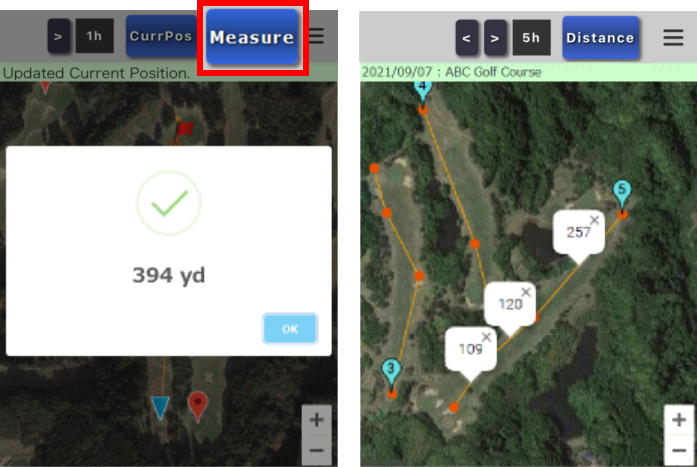
4. Measure Button
Displays the distance between your
current location and the green. If more than three seconds have
passed since the last location update, the app will automatically
refresh your position before displaying the distance.
5. Notification Bar
Displays comments and guidance
generated by Yard Checker.
6. Main Display Area
Shows a satellite image from
Google Maps with markers indicating your current location and the
green.
Pre-Registration
The position of the ball (current position) can be obtained by using
the GPS of a smartphone or other mobile device.
Targets (green positions) can be set during play, but it is
convenient to set them at your home beforehand.
About collecting green position data
The green position data set by each individual is automatically sent
to the data server.
In the future, we plan to accumulate this
data and automatically display the target (green position) without
each player having to set it.
Please be assured that the data sent to the server is the location information necessary to calculate the green position.
Other languages
Japanese